

In today’s digital world, ranking on Google is more than just a plus; it’s a must-have. Be it as a business owner, a blogger, a freelancer, or a digital marketer, your visibility on Google defines how many people find you, believe in you, and shop from you. But when there are billions of webpages vying for attention, the question that remains is:
How do you rank on Google using SEO?
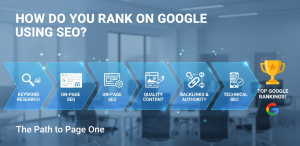
SEO means Search Engine Optimization, and basically, it means optimizing your website so that it shows up on Google when anyone searches for something relevant to your business. The better the SEO, the higher your chances are of showing up on the first page—and that matters, because over 90% of users never go past the first page of search results.
In this blog, we’ll break down how SEO works and provide a step-by-step approach that can help you rank your content in Google from now until 2025 and beyond.
Understanding How Google Ranking Works

Google’s task is straightforward: provide the best content, most relevant to users.
For that, it analyzes hundreds of ranking factors, which include:
Keywords used are
How useful your content is (quality, value, depth)
Website authority: backlinks, credibility
Page experience and loading speed
User engagement and readability
Meanwhile, Google introduced a new AI-powered search result called the Search Generative Experience (SGE), meaning that now, more than ever, content needs to be more valuable, trustworthy, and helpful.
SEO isn’t about keywords anymore; it’s about user experience + helpfulness + authority.
Step 1: Choosing the Right Keywords

Ranking starts with targeting the right keywords.
Keywords are the words users type into Google while searching for something.
There are two main types:
- Short-tail keywords include broad topics and high competition.
Example: Digital marketing
- Long-tail keywords: more specific, easier to rank
Example: How to start digital marketing with zero budget
The second type targets search intent, and hence this is ideal for beginners.
How to find keywords:
Use tools like
- Google Keyword Planner (free)
- Ubersuggest
- AnswerThePublic
- Ahrefs / SEMrush (paid)
Focus on keywords that have:
- Good search volume
- Low to medium competition
- Clear user intent
Example: Instead of targeting “weight loss,” target “weight loss diet plan for beginners.”
Step 2: Produce high-quality, useful content

Today, Google focuses on ranking EEAT content: Expertise, Experience, Authoritativeness, and Trustworthiness.
This means that your content should reflect:
- Practical experience
- Real knowledge
- Real value
To rank your content:
- Understand what users are searching for.
- Give them the best, most complete answer.
- Add personal insights or examples—Google loves unique content.
Ask yourself:
“If somebody searches using this keyword, what information am I expected to provide?”
Your text should:
- Answer questions
- Solve problems
- Be easy to read
- Use short paragraphs, headings, and bullet points where possible. Include images where appropriate.
Step 3: On-Page SEO—Optimize Your Content for Google

Everything you do inside the content to help Google understand it is on-page SEO.
Here’s what to optimize:
Title (H1)
Include your main keyword.
Example:
How to Rank on Google Using SEO: A Beginner-Friendly Guide
First paragraph ✅
Mention the primary keyword in the introduction.
Heading Format (H2/H3)
Break up your content using headings with variations of the keyword.
- Keywords placement
This is where you would place keywords naturally in
- Title
- First 100 words
- Headings
- Meta description
- Image ALT text
- URL structure
- Keep URLs short and keyword-focused.
Example:
Created: /rank-on-google-using-seo
❌ /how-to-rank-your-new-business-website-on-google-fast-2025-update
- Internal linking
Link to other relevant pages on your site.
- External linking
Link to credible sources—Google loves references.
Step 4: Improve Page Speed & Mobile Experience

Google has confirmed that page speed and mobile optimization are ranking factors.
Over 70% of all searches are now done on mobile devices, so your website needs to be fast and mobile-friendly.
Use the following tools to check your performance:
- Google PageSpeed Insights
- Google Mobile-Friendly Test
Improve performance by:
- Compressing images
- Using a fast hosting provider
- Reduce unnecessary plugins
- Using lightweight themes
A fast site = better user experience = better rankings.
Step 5: Build Backlinks (Authority Building)

Backlinks are when another website links to yours.
Google looks at backlinks like votes of trust: the more you have from trusted websites, the better chance you have of ranking high.
Ways to build backlinks:
Guest Blogging—Write for Authority Blogs.
Create share-worthy content: infographics, guides, and data posts.
Create listings in business directories for local SEO.
Collaborate with influencers and bloggers.
Backlinks inform Google that
“This information is helpful and reliable.
Avoid spammy backlinks, and quality often beats quantity.
Step 6: Optimize for User Experience (UX)

Google will track users’ behavior on your website:
- How long they stay
- Whether they scroll
- Whether they click other pages
- Whether they bounce quickly
If users are staying longer, Google then moves your content higher.
Improve UX by:
- Writing short sentences and paragraphs
- Using visuals
- Examples or case studies given
- Using proper spacing to improve readability
- Your content should be easy to navigate and enjoyable to consume.
Step 7: Leverage AI in Support of SEO

AI tools can help with:
- Keyword research
- Content outline
- Meta descriptions
- Topic clusters
- SEO optimization
But remember:
- AI should augment your creativity, not replace it.
- Google rewards human insights, not AI-generated fluff.
Step 8: Be Consistent (The Secret Nobody Talks About)
SEO is not a one-off activity.
You are to:
- Posting regularly
- Update older content
- Monitor your ranking
- Keep improving
Tools to track SEO performance:
- Google Analytics
- Google Search Console
- Ubersuggest
SEO takes time.
Some pages rank in weeks, but others take months. Consistency builds authority.
Common SEO Mistakes to Avoid

- Keyword spamming
- Copying others without adding value
- Zero internal linking
- Ignoring mobile speed
- Publishing content without research
Fix these and you’ll automatically start ranking better.
Conclusion

It’s not about tricking the algorithm into ranking higher in Google but actually helping out the users. To rank on Google using SEO: Research correct keywords Create informative, useful content. Optimize your pages correctly. Build authority using backlinks. Emphasize the user’sexperience. Stay consistent; SEO is not instant, but the results are long-term, stable, and scalable. When you commit to creating helpful content, Google will reward you.